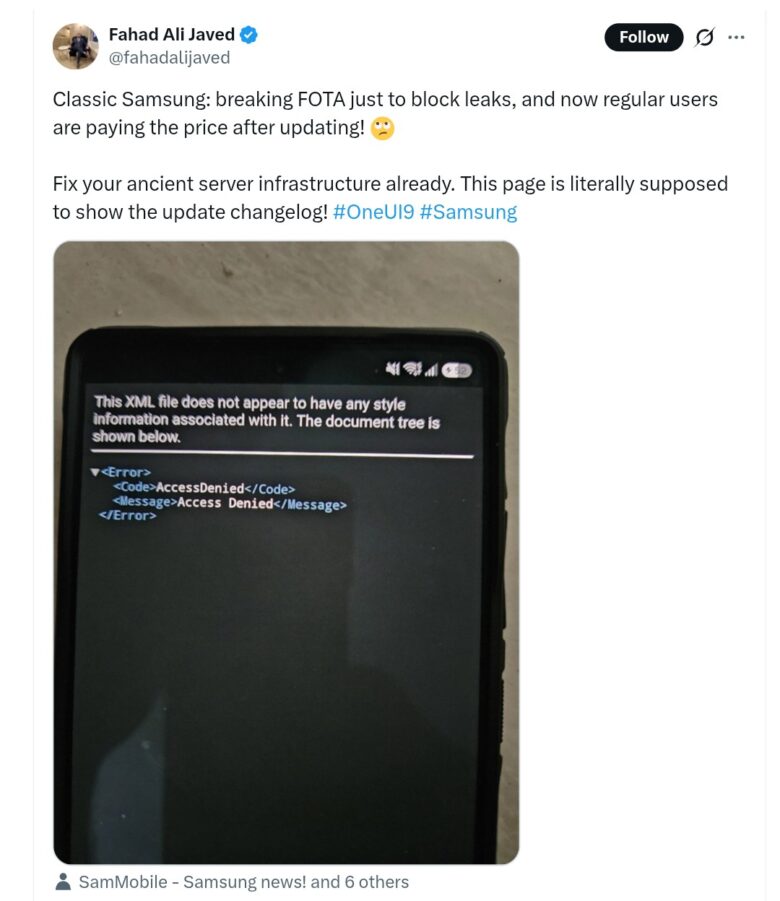
Samsung One UI 9 Update Triggers XML ‘Access Denied’ Error for Users
Samsung unveiled its stable One UI 9 update on July 22, 2026. The company began a public rollout of the Android 17 user interface skin on September 16, 2026. Updating to One UI 9 comes with many benefits, including My FanCam, Call brief & Scam detection, and the continuous scrolling layout in Interpreter. However, many users also reported a few bugs with the update. A good example is the XML “Access Denied” error that users started experiencing after installing One UI 9.
What happened?
One UI 9 is a major update and as such, many users expect it to come with many amazing features. Of course, the update brought a few new additions—a good example is Now Brief’s transparent health data permission controls. But as with other updates, One UI 9 isn’t without its issues. According to recent reports, some users are now reporting an annoying post-update bug they’re experiencing. Most affected users said the issue started after they finished installing the new update.
One Redditor reported that he keeps getting an XML “Access Denied” error message after installing the update successfully and the phone boots into the One UI 9 setup screens. The user said:
“Anyone got a page after OneUI AI Features with XML that shows the details “Access Denied”? Not able to pass this page until disconnecting from WiFi from the router side and then being able to continue to the Welcome screen.”
After going to several reports, we confirmed that this issue is widespread and it affects different Samsung models, including Galaxy S24 series, Galaxy S24 series, Galaxy S26 series, and Fold 7. However, we’re still unclear about the full extent of the affected models. It’s also worth knowing that this One UI 9 “Access Denied” error message doesn’t affect all users—a Galaxy S25 owner noted that he experienced no issues after updating his phone.
How to clear the One UI 9 XML “Access Denied” error message
At the point of writing this post, Samsung hasn’t yet given any update on why users are experiencing this issue. However, a Tipster Fahad Ali Javed said the error seems to be a Samsung server-side change, which is intended to curb firmware leaks.
While there’s no official fix yet to address this issue, some affected users suggested a few effective workarounds. For instance, a Redditor suggested force-restarting the device to clear the One UI 9 XML “Access Denied” error message. You can do this by:
- Holding the volume-down + power buttons at the same time to force-restart the phone.
- As soon as the Samsung logo appears, hold Volume Down to boot into Safe Mode.
- Next, turn on Airplane Mode and disable Wi-Fi and mobile data.
- Ensure you disconnect from all networks and then restart the phone normally.
Many affected users who tried this workaround acknowledged its effectiveness. However, if you are unable to drag the wifi settings down, just like this user, another thing you can do is to turn off your Wi-Fi router and remove your SIM. Alternatively, you can move away from the Wi-Fi range, while also disabling your mobile data.